ChatGPT, Claude, Gemini
Your AI wrote the workout plan. Now follow it.
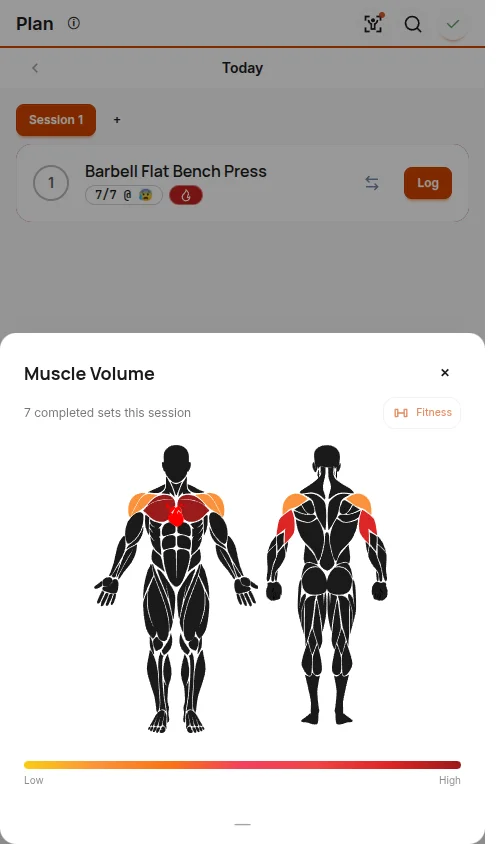
Copy the prompt, ask ChatGPT, Claude, or Gemini, then paste the reply into YesCoach. Every set you log shows on your muscle map.
Your prompt
One session for today. Paste the reply in the app. Choices are optional: anything you leave open, the AI chooses for you.
Preview prompt
Write me one workout in the YesCoach format below, ready to paste into the YesCoach app.
Do not ask me any questions. Where I have not said something, choose what suits me and write it now.

Write exactly one entry in "days". Reply with the workout as one ```json code block, then one short line on what it trains. Nothing else.

FORMAT (YesCoach program format 1.2). The app rejects the whole reply if any rule is broken.
{
  "version": "1.2",
  "type": "yescoach_program",
  "program": {
    "name": "Push Day",
    "category": "training",
    "days": [
      {
        "name": "Push",
        "exercises": [
          { "exerciseId": "shoulder-circles:standard:bodyweight:none", "exerciseName": "Shoulder Circles", "sets": 1, "reps": "10", "suggestedRIR": 5, "section": "warmup" },
          { "exerciseId": "bench_press:flat:dumbbell:none", "exerciseName": "Dumbbell Flat Bench Press", "sets": 3, "reps": "8-10", "suggestedRIR": 2, "restSec": 120 },
          { "exerciseId": "shoulder_abduction:standard:dumbbell:none", "exerciseName": "Dumbbell Lateral Raise", "sets": 3, "reps": "12-15", "suggestedRIR": 1, "groupId": "A" },
          { "exerciseId": "elbow_extension:overhead:dumbbell:none", "exerciseName": "Dumbbell Overhead Extension", "sets": 3, "reps": "10-12", "suggestedRIR": 1, "groupId": "A" }
        ],
        "groups": [ { "id": "A", "type": "superset", "rounds": 3, "restBetweenSec": 15, "restAfterSec": 90 } ]
      }
    ]
  }
}
Rules:
- exerciseId and exerciseName: copy BOTH exactly from one line of the EXERCISES list below. Never invent, shorten or edit an id.
- category: "training" for strength, "protocol" for mobility.
- sets: whole number 1-20. suggestedRIR: whole number 0-10 (reps left in reserve; 5 for warm-up and mobility moves).
- reps: only "8", "8-10", "30s", "30-60s", "10/side", "8-10/leg" or "30s/side". Seconds for holds and stretches. Never words like AMRAP.
- restSec (optional): seconds of rest after each set. Not on group members.
- section (optional): "warmup", "power", "accessories" or "cooldown". Leave it out for main work. Never on a group member (put it on the group).
- groups (optional, supersets and circuits): each group {"id","type":"superset" or "circuit","rounds","restBetweenSec","restAfterSec"}; members carry "groupId", sit next to each other in the list, number at least 2, and their sets equal the group's rounds. Leave "groups" out when there are none.
- No comments, no trailing commas.
Before you reply, check every rule above, especially that each exerciseId is copied from the list.

EXERCISES (exerciseId | exerciseName). Use only these:
[413 exercises that fit your choices]
Nothing set
The AI picks the rest.
New to YesCoach? Get it free on Android, then import the workout from the Plan tab.
After you copy the prompt
Ask your AI
Paste it into ChatGPT, Claude, Gemini, or any other AI chat. Any AI that can write JSON works. It writes one workout in the YesCoach format.
Copy the whole reply
Select everything the AI wrote, code block included. Or download the .json file it offers.
Import it
In YesCoach, open the Plan tab on an empty day and tap Import from AI. Tap Paste workout, or Choose a file for a download. In the ChatGPT app you can also use Share to send the reply to YesCoach, then tap Import shared workout.
Common questions
- Can ChatGPT make a workout plan?
- Yes. ChatGPT, Claude, and Gemini can all write a workout from your focus, session length, and equipment. The prompt on this page makes them write it in a format YesCoach can import.
- How do I import a workout from ChatGPT?
- Copy the prompt on this page, paste it into ChatGPT, and copy its whole reply. In YesCoach, open the Plan tab on an empty day, tap Import from AI, then tap Paste workout.
- What if YesCoach does not have an exercise the AI picked?
- YesCoach swaps it for the closest match and tells you which exercise it used. The workout still imports.
- Can I import a whole program?
- Yes. Switch the prompt to Program so the AI writes every day. In YesCoach, open the Plan tab with no workout in progress, tap the Programs icon at the top, then Import and pick the file.
- Does the AI need to browse the web?
- No. The prompt carries the format and the list of exercises that fit your choices, so any AI chat can write the workout, even one that cannot open links.
- Is YesCoach free?
- Yes. Importing workouts and programs, logging sets, and the muscle map are free on Android.
Prefer a ready-made plan? YesCoach ships ten free programs. See the beginner programs and mobility routines.